Welcome to ASPCalendar!
Home Page: http://www.u229.no/stuff/ASPCalendar/
If everything works you should now see a live calendar on the left.
| abril 2026 |
| d | s | t | q | q | s | s |
| | | | 1 | 2 | 3 | 4 |
| 5 | 6 | 7 | 8 | 9 | 10 | 11 |
| 12 | 13 | 14 | 15 | 16 | 17 | 18 |
| 19 | 20 | 21 | 22 | 23 | 24 | 25 |
| 26 | 27 | 28 | 29 | 30 | | |
View maio
| maio 2026 |
| d | s | t | q | q | s | s |
| | | | | | 1 | 2 |
| 3 | 4 | 5 | 6 | 7 | 8 | 9 |
| 10 | 11 | 12 | 13 | 14 | 15 | 16 |
| 17 | 18 | 19 | 20 | 21 | 22 | 23 |
| 24 | 25 | 26 | 27 | 28 | 29 | 30 |
FEATURES:
- ASPCalendar is a complete out-of-the-box application that can be included on your own asp pages.
- Dates with events are shown as links in bold text. When you click one of them a window shows information on events for that specific day. Events can be shown in a popup window or in a new browser window.
- Site owner can edit events from within the calendar itself using a cookie. No log-in is required.
- The calendar is pure html and can therefore be loaded very fast.
- ASPCalendar can create two calendars, one for the current month and one for next month.
- Displaying the calendar in your language and with your own regional date format is easy.
- Events older than 1 month are automatically deleted - no need to maintain the database.
A quick tutorial of how to make this calendar work for you:
 INSTALLATION:
You should by now have uploaded the files to your web server and opened start.asp (this file :-) in your web browser. Requirements: Your web server must support ASP (Active Server Pages). Cookies must be enabled in your browser, at least for this domain. And you must have write permissions for the ASPCalendar folder.
TO DISPLAY A CALENDAR ON A PAGE:
Step 1: Put this line near the top of your page: <!--#include file="aspcalendar_routines.asp"-->
Note that you have to adjust the file paths if the uploaded files are not located in the same folder as the page you want the calendar to be shown in.
Then place this line where you want the calendar to appear: <%Response.Write ShowCalendar%>
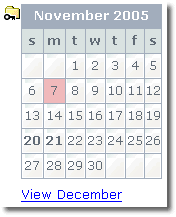
When you opened this file (start.asp) in your web browser a cookie was set on your computer. This cookie allows for direct creating and editing of events from the calendar itself. A small folder image will appear near the calendar heading, and when you click this image you are taken to the admin page where you create your first event.
Now, if you see the folder image in the calendar at the top of this page, everything should be fine. All other users/viewers of the calendar will NOT see this image and will NOT be able to create/edit events. (See the two examples on the left.) Therefore, when the cookie is set you should RENAME START.ASP. This will prevent others from opening this file and grant access to the admin area. Unless the cookie on your computer is deleted, there will be no need to run this file again.
Step 2: You need to set certain parameters, for instance the path to your database and your preferred date settings. This is done in the file aspcalendar_routines.asp. Open that file in your text editor and just follow the instructions there.
After you have created a new calendar or a new event, you will have to reload the calendar for the changes to take effect.
If you find bugs, please report them at http://www.u229.no/stuff/ASPCalendar/. In particular I would like to know what happens on January 1st :-)
Also, if you make improvements to the code, or create better looking css, please share it with the rest of us.
Enjoy!
Therefore: For that or this for it.
© www.u229.no